Prerequisites
First : you need to have an iTop instance (3.2 for example).
Before setting up the iTop Portal, ensure that your environment meets the following requirements. This section outlines the necessary software and tools to successfully install and run the portal.
Environment Requirements
The iTop Portal is built to run on a server with the following specifications:
- PHP 8.2: The application requires PHP version 8.2 or higher. Ensure that your server has this version installed, along with common extensions like
php-mbstring,php-xml, andphp-mysqlfor full compatibility with Laravel. - Apache: A web server such as Apache is required to serve the application. Ensure that the
mod_rewritemodule is enabled for proper URL routing. - MariaDB: The portal uses MariaDB as its database management system. Version 10.6 or later is recommended for optimal performance and compatibility.
Note: While Apache and MariaDB are recommended, alternatives like Nginx or MySQL may work with additional configuration. Refer to the Laravel documentation for more details on supported environments.
Development Tools
To install dependencies and manage the project, the following tools must be available on your system:
- npm: Node.js package manager (version 16.x or later recommended) is required to install and build the front-end assets.
- Composer: PHP’s dependency manager (version 2.x or later recommended) is necessary to install Laravel and other PHP dependencies for the iTop Portal.
Installation Check
To verify that your environment is ready, run the following commands:
- Check PHP version:
php -v - Check Apache status: Ensure your server is running (e.g.,
sudo systemctl status apache2on Debian-based systems). - Check MariaDB: Confirm it’s installed and running (e.g.,
mysql --version). - Check npm:
npm -v - Check Composer:
composer --version
If any of these tools are missing or outdated, install or update them before proceeding to the installation steps.
Using the iTop Webservice
The portal uses the iTop webservice to interact with it.
It is therefore absolutely necessary to create a specific user in iTop with the REST Service User and Administrator roles, as shown below:
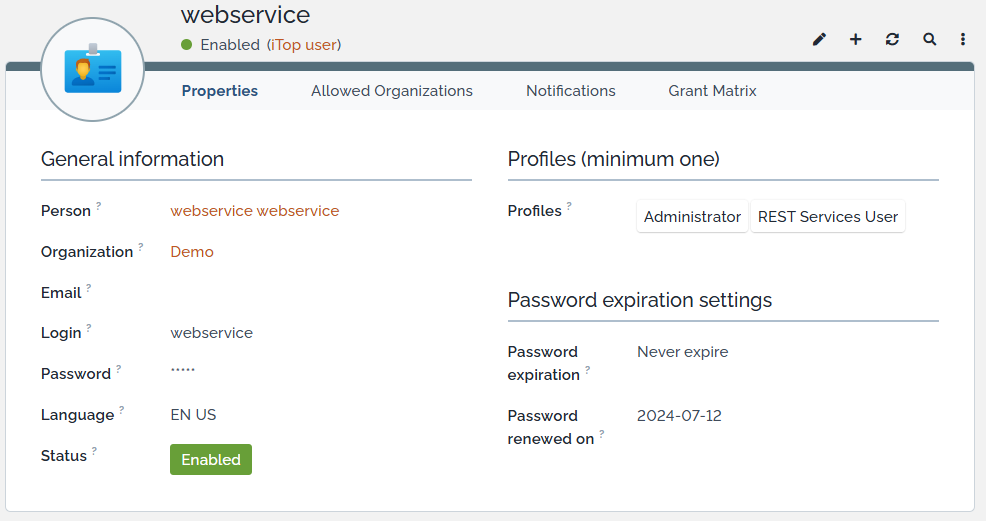
This account (associated with its contact) will have a login and password that you will need to specify in the portal configuration, see Installation, configure the environment.
The REST Service User role is essential to use the webservice provided by iTop. The Administrator role allows the portal to perform all necessary operations.